Crossing the Chasm: Progressive​ Enterprise Architecture Model (PEAM)

[Updated October 5, 2016]

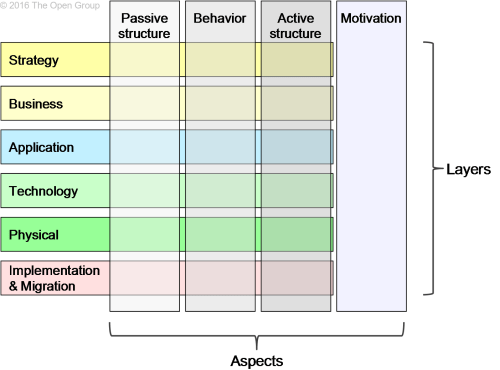
Inspired by Gerben Wierda’s thoughtful discussion about how the full framework is depicted in the new ArchiMate* 3.0 specification (An AchiMate 3 Map (Layers? What Layers! — 1)), I’m going to suggest there’s another level of improvement that can be made to the specification’s “peanut butter and jelly sandwich” diagram. [Please excuse the visual metaphor but that’s what it looks like – with PB&J leaking out on all sides.]

image004

Figure 1. ArchiMate 3 Layers and Aspects

In his posting, Gerben suggests a succession of improvements (depicted below).

This slideshow requires JavaScript.

Figure 2. Gerben Wierda’s Suggested Improvements

But they still left my question unanswered: Why were Strategy, Motivation, Implementation & Migration left as disconnected layers on opposite sides of the enterprise architecture map? [I don’t accept Motivation being classed as an Aspect but that’s a topic for another article.]

What happened to the architectural principles of simplicity and elegance?

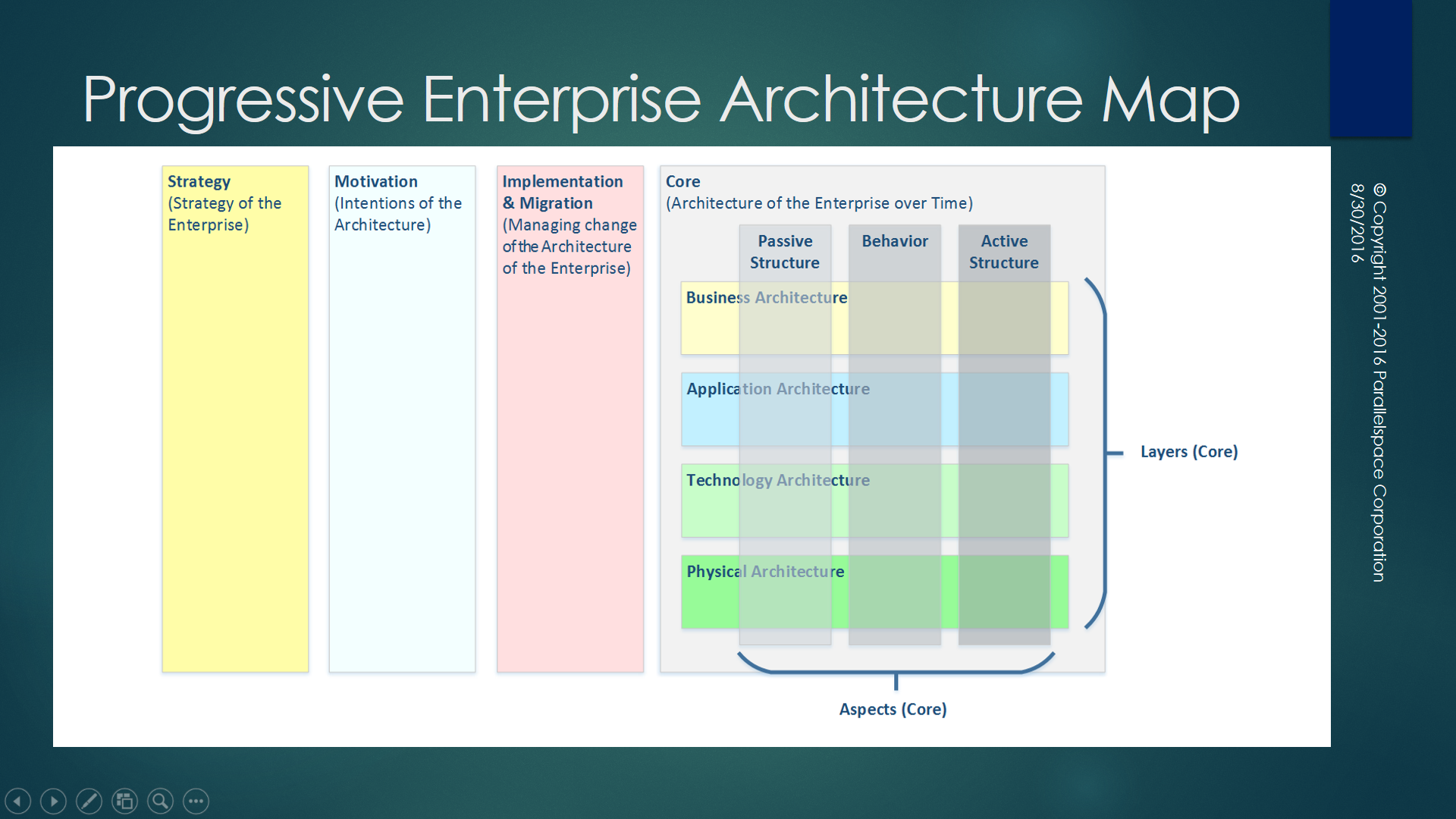
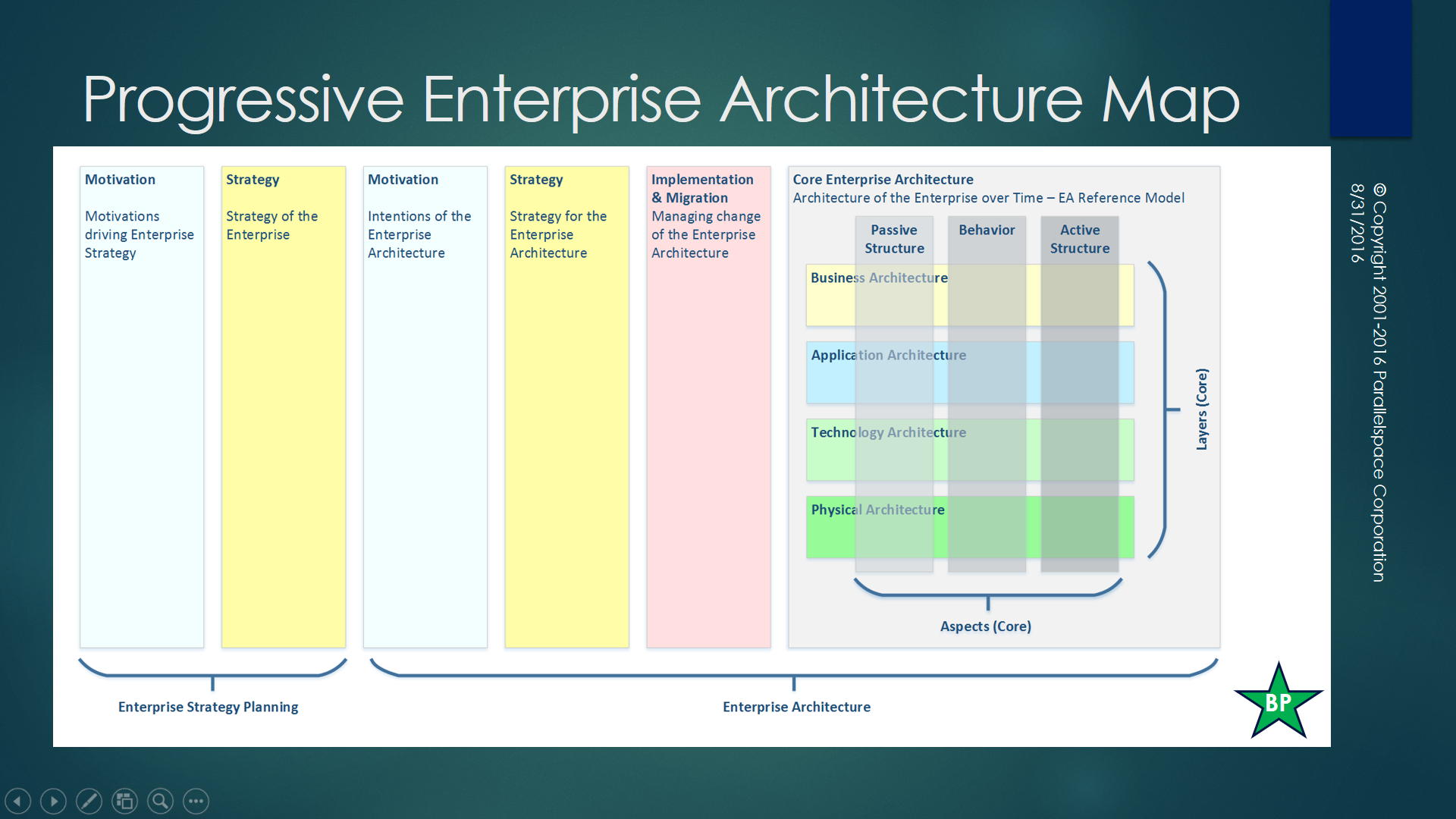
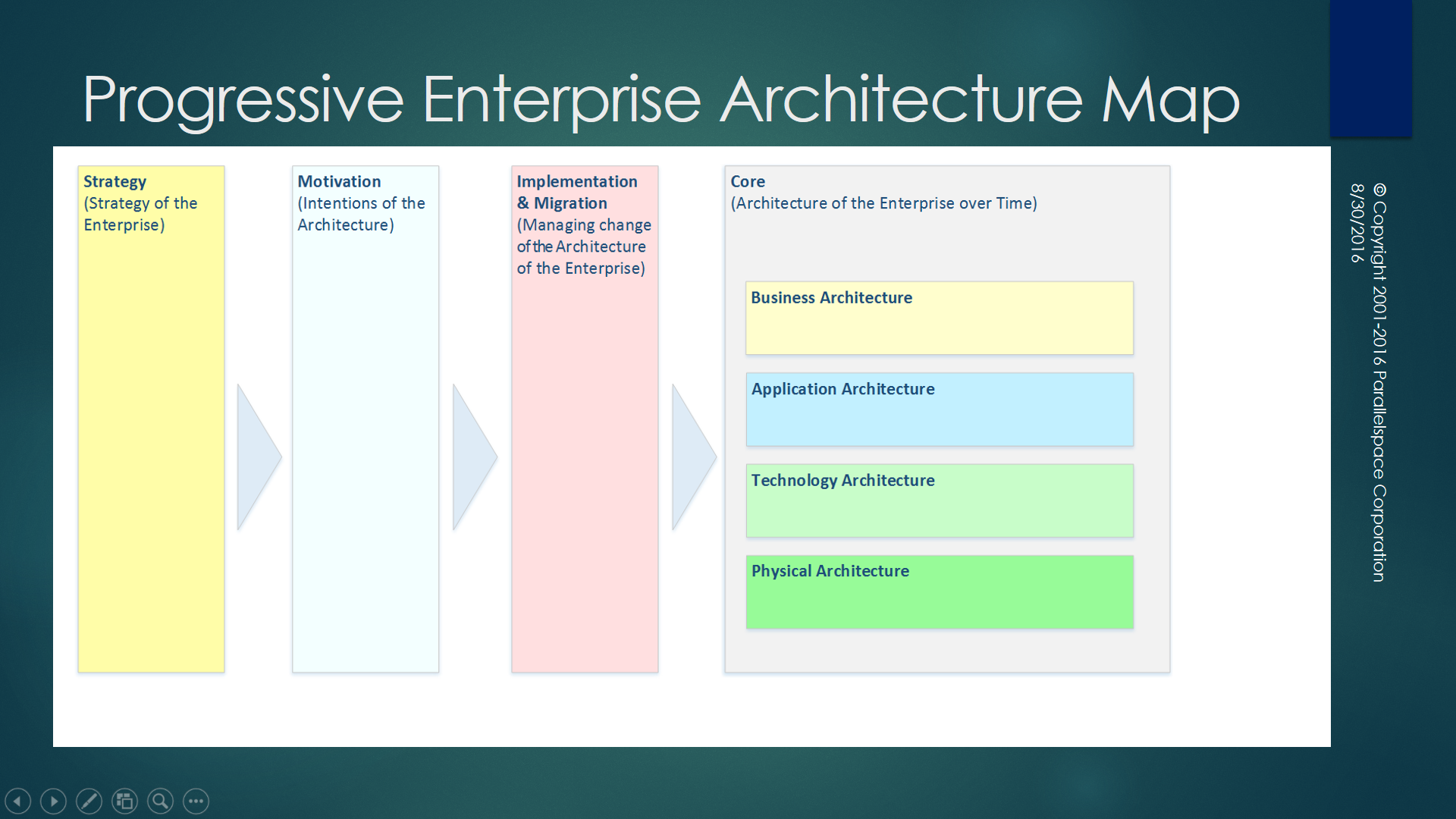
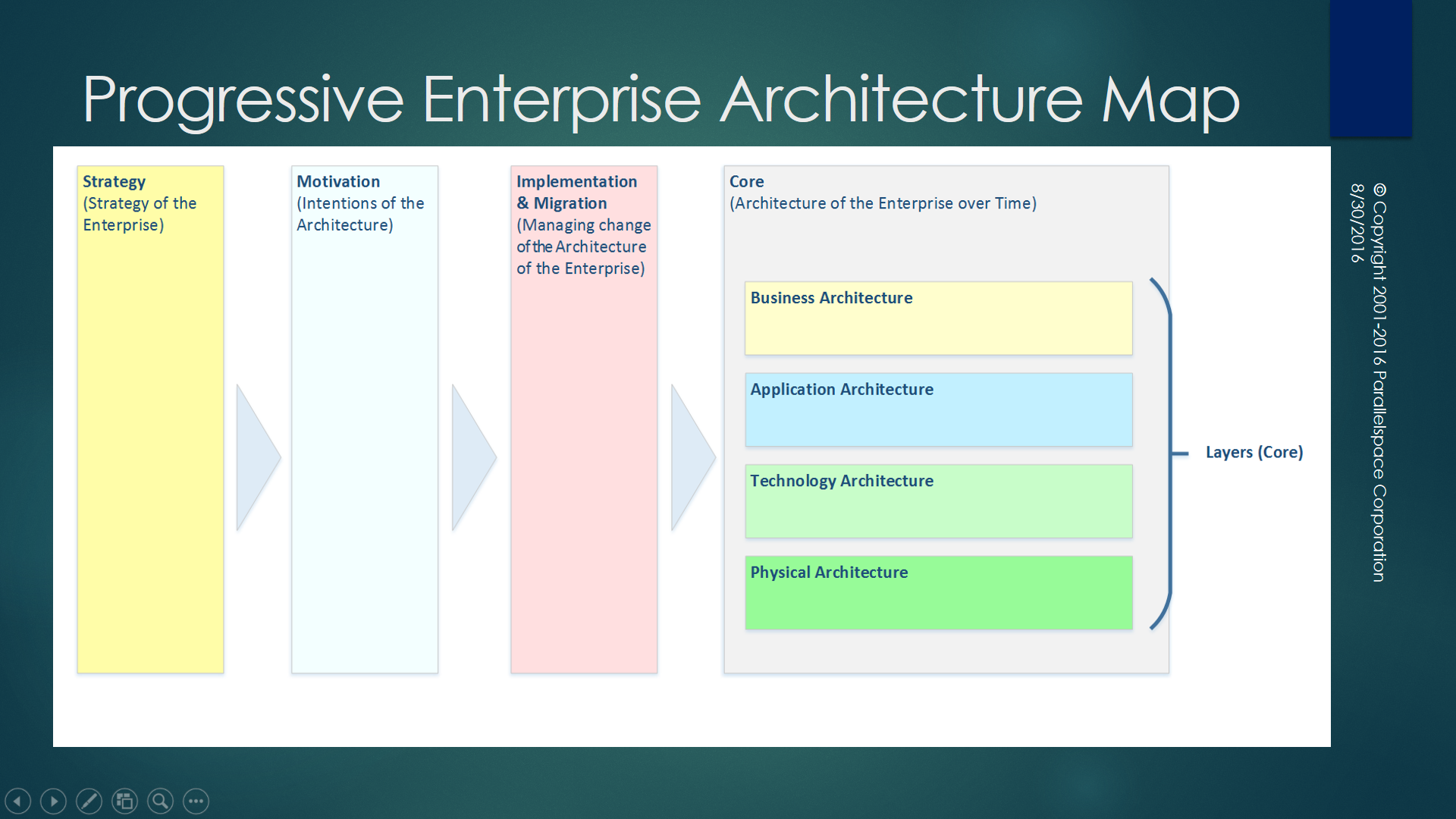
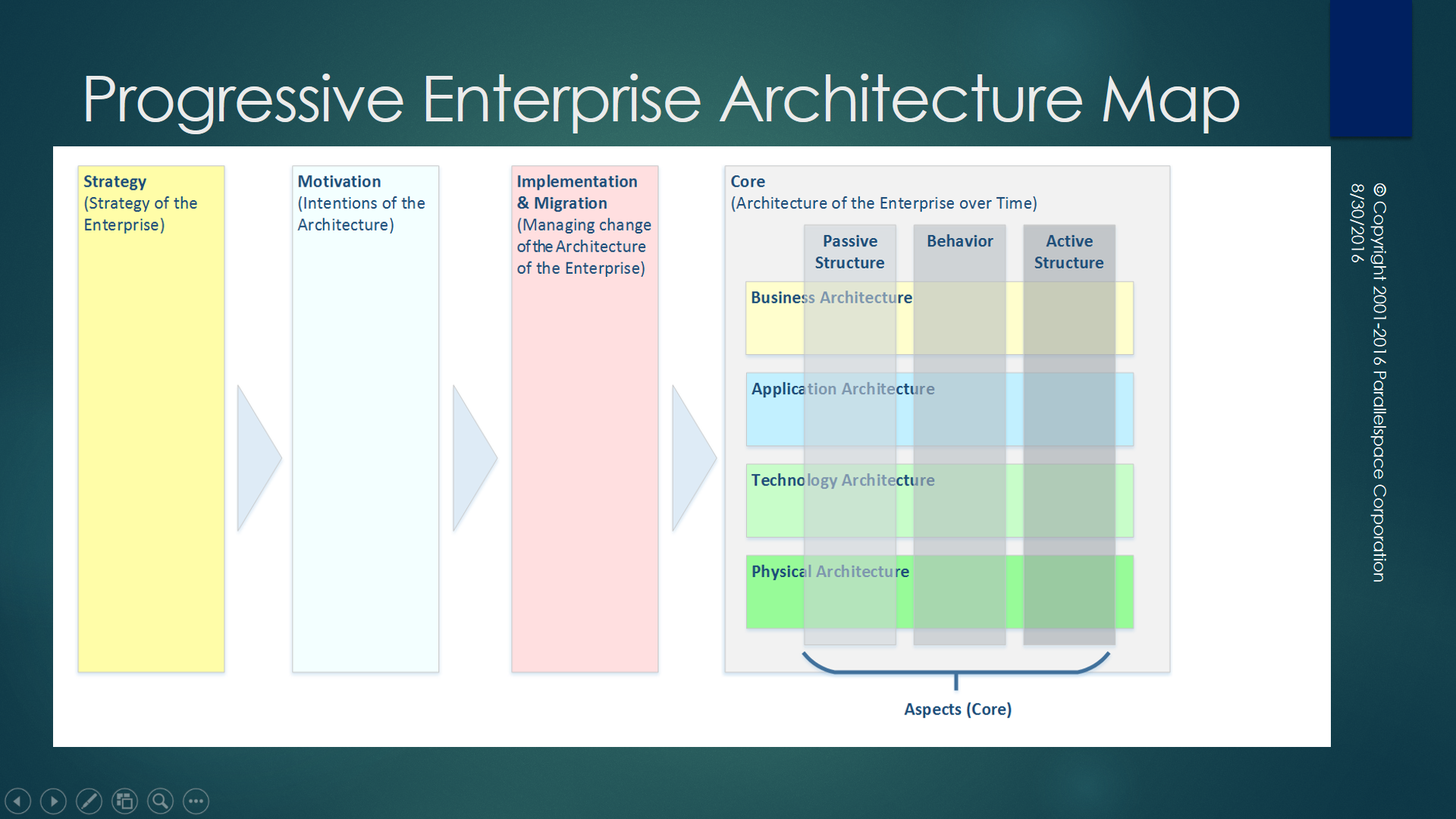
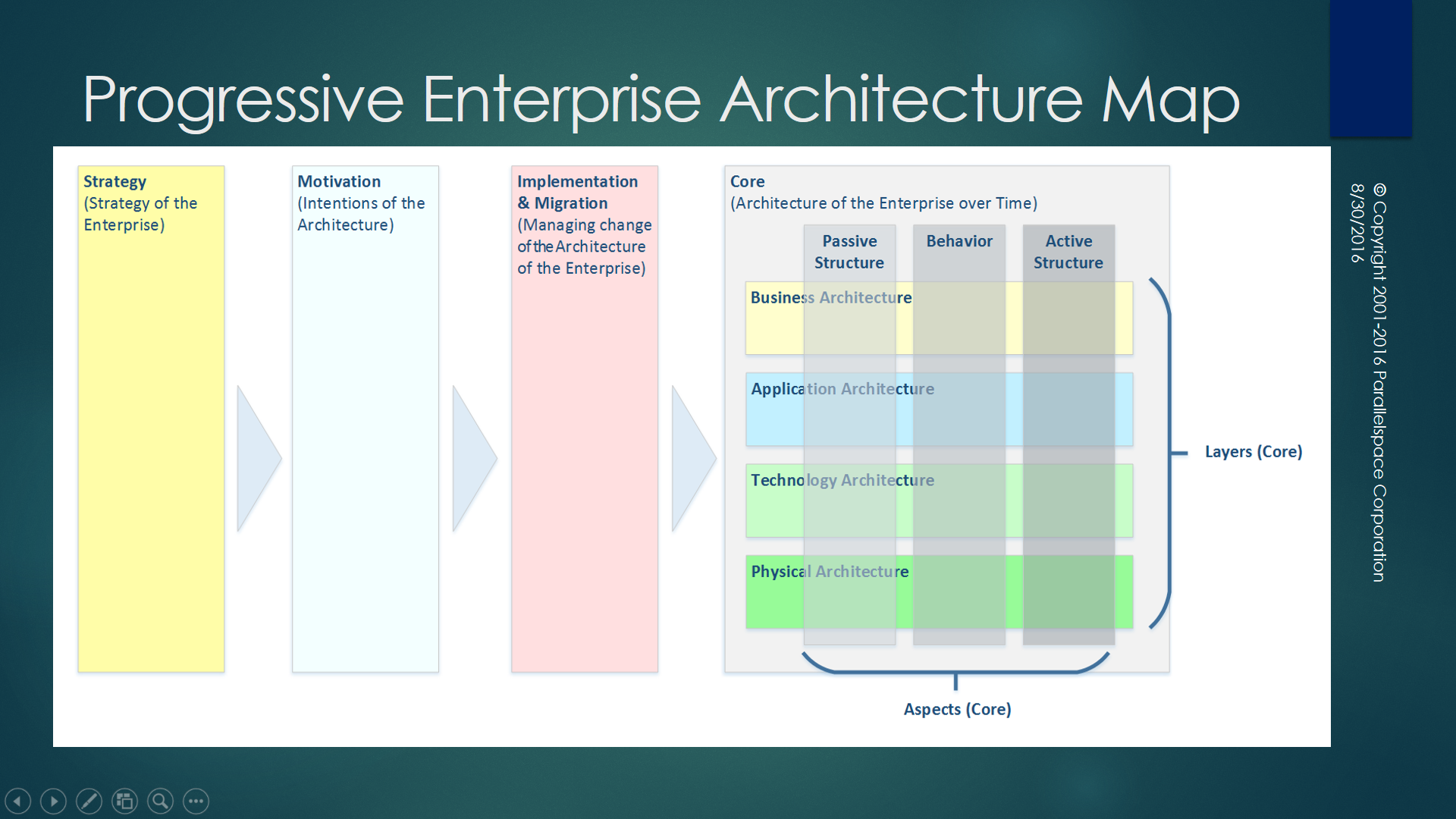
Aren’t the following series of enterprise architecture maps more informative and more understandable?  …more pragmatically useful?  I refer to the version below as the Progressive Enterprise Architecture Map.

Progressive EA Model 1-0-2-Base-Slide

Progressive EA Model 1-0-2-Layers-Slide

Progressive EA Model 1-0-2-Aspects-Slide

Progressive EA Model 1-0-2-Both-Slide

Figure 3. Progressive Enterprise Architecture Model: Progressive Enterprise Architecture Map

Check them out for yourself and please add your feedback in the Comments section below. Click on any diagram to see a larger version.

Best regards,
Michael Herman (Toronto)

p.s. If the arrows make the enterprise architecture map too prescriptive from a pure ArchiMate specification perspective, what do you think of this version?

Progressive EA Model 1-0-3-NoArrows-Slide

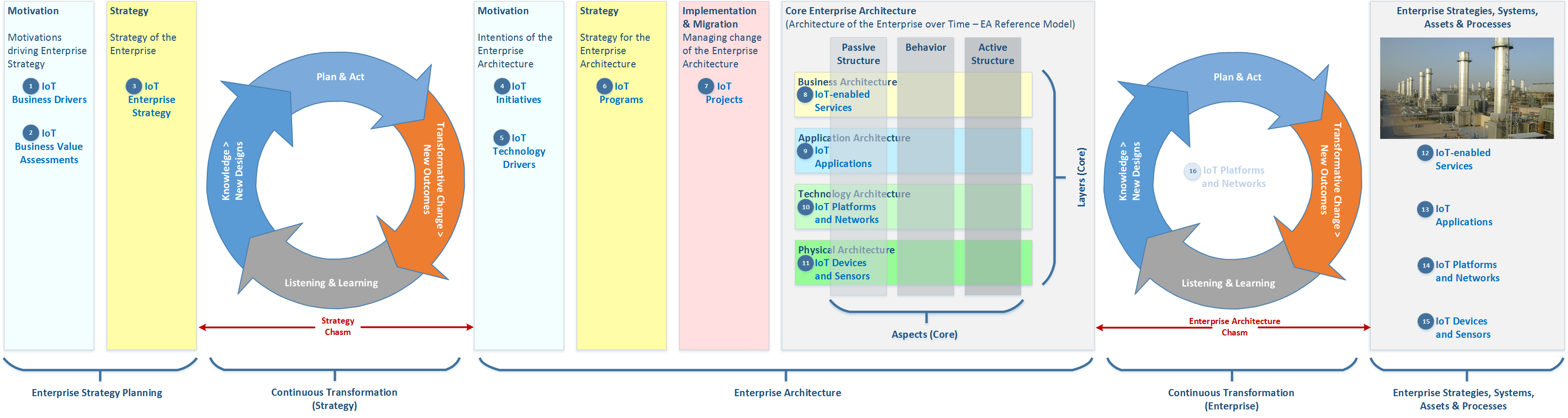
p.p.s. In October 2016, in the article Crossing the Enterprise Architecture Chasm, I extended PEAMs to include:

  • Continuous Transformations
  • Strategy Chasm
  • Enterprise Architecture Chasm

Here’s an example (click to enlarge):

progressive-ea-model-1-0-6-peam3-chasms

*ArchiMate is a registered trademark of The Open Group.

6 Comments

Filed under ArchiMate, Architecture Reference Models, Automated Application Architecture Analysis, Crossing the EA Charm, Enterprise Architecture, Progressive Enterprise Architecture Map (PEAM), The Open Group

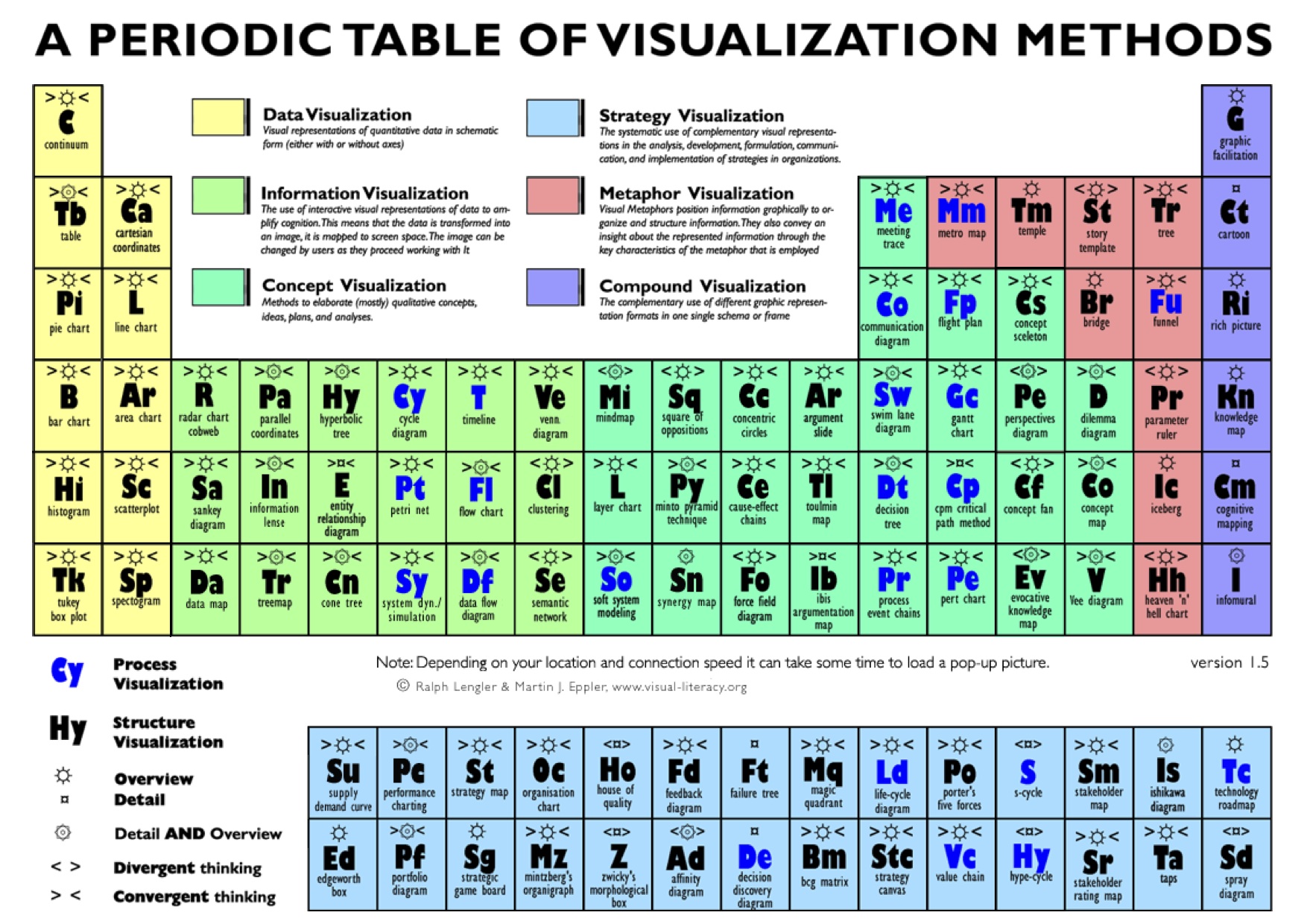
Periodic Table of Visualization Methods

periodic_table

Leave a comment

June 15, 2016 · 9:13 pm

MS Azure is a bit of a bucket of bolts …very good bolts …but relative to the other IoT vendors, a bucket of bolts.

Michael Herman: Yes, there’s lots of “stuff” but I don’t see any content that targets Architects in the same effective ways that the [other vendor] content does. MS Azure is a bit of a bucket of bolts …very good bolts …but relative to the other IoT vendors, a bucket of bolts. Where’s the equivalent of a Google map that shows me the least cost or least complexity or hyper-performant architectures for receiving events, processing them through an easily composable and implementable pipeline of post-processing steps, and then persist the results and make them available through Power BI? …without constantly having to dig through the bucket or using Web Jobs as band-aids between every pair of Azure services?

Microsoft: Michael – are these more of what you had in mind:
https://azure.microsoft.com/en-us/documentation/articles/iot-suite-remote-monitoring-sample-walkthrough/
https://azure.microsoft.com/en-us/documentation/articles/iot-suite-predictive-walkthrough/
The Azure IoT Suite preconfigured solutions are actually implementations of the IoT Suite Reference Architecture you refer to above.
Thanks for the feedback, we’re actually discussing having more of an architectural center right now internally – can you provide more information on what you’d like to see?

Michael Herman: What does Nirvana look like? An Expedia-like traveling booking experience for all of Microsoft Azure where I provide my departure point, destination(s), and all the points in between (stopovers) and Microsoft produces a series of “flight options” (detailed architectures with *diagrams* and customizable blueprint/recipe documentation) where each option is differentiated by Azure cost, complexity, and performance …just like booking a flight. I get to choose the option (aka architecture) that suits my requirements and budget. Simple 😉

1 Comment

Filed under Uncategorized

Subject: MS Azure Services: Is there an overarching architectural vision?

From: Michael Herman (Parallelspace)
Sent: Monday, May 16, 2016 7:58 AM
To: Mark Russinovich; Scott Guthrie
Subject: MS Azure Services: Is there an overarching architectural vision?

Hi Mark and Scott,

I’m pretty sure that you and I have never met – although I’ve been building apps on the Windows platform since 1986 (version 0.989 of the SDK) and I worked for MSFT from 1996-2001 – mostly on the SharePoint team.

My question is: Is there an overarching architectural vision for the (complete) MS Azure platform? There doesn’t appear to be and I’ll give you an example in a second.

It appears like we’re back in 1996 when Billg/Microsoft finally “got the Internet” and every product group began a completely different, disconnected, uncoordinated effort to add “Internet” to their own little piece of software (e.g. HTML publishing mostly; support for some Internet protocols; etc.) Every day something new was being “released to the web (RTW)” and the Microsoft platform was a mess.

What I saw with Microsoft and the Internet in 1996 is happening all over again with the Microsoft Azure strategy: a disconnected and uncoordinated and not well documented strategy and implementation. Azure [as a strategic platform] is a mess.

My example: MS Azure services, MS IoT Suite, MS Cortana Suite, Azure Logic Apps.

The whole MS approach to Azure Event Hubs is extraordinary (good): Lightweight, inexpensive, brain-dead easy to use, largely unrestricted in terms of how Event Hubs can be used and the use cases they can support.

If I have some event data in an Event Hub, the very next thing I want to do is perform some post-processing of the event data – ideally staying with a streaming, hyper-scalable architecture. I [also] want to create an easily composable pipeline of activities that each perform some sort of processing of each event as the events progress through the pipeline. I want the pipeline activities to be easy to design and implement (e.g. kind of like PowerShell cmdlets but it doesn’t have to that specific implementation pattern but with a similar simple pattern that is easy to build upon).

But which MS Azure services have native support for consuming event data stored in an Azure Event Hub? …almost none

…except for Azure Stream Analytics. But what about Azure Data Factory? What about Azure Logic Apps? Are there other Azure Services I should be considering? …without having to build and manage [several] custom Azure WebJobs and use all sorts of intermediate Azure storage just to connect the applicable Azure services together?

Of the 3 options I listed, you chose the one, Azure Stream Analytics, that has [the] most baroque programming model (some SQL derivation). None of the latter two have any native support for event data stored in an Event Hub and they are a lot easier to use than Stream Analytics SQL scripts.

Where is the Azure documentation that is targeted at Architects?

The MS IoT Suite team has started a good MS IoT Reference Architecture document: http://download.microsoft.com/download/A/4/D/A4DAD253-BC21-41D3-B9D9-87D2AE6F0719/Microsoft_Azure_IoT_Reference_Architecture.pdf

Where is the consistent set of similar documents for the other collections of MS Azure services? Where is the overarching MS Azure architecture document?

Given a starting point and a goal (and some intermediate subgoals), where is the “Google Map” of all of the possible connections and routings across all of the MS Azure services?

MS Azure-Google Map

Can you help?

Best regards,
Michael Herman (Toronto)

1 Comment

Filed under Uncategorized

NASA Apollo 11 Flight Plan – July 1, 1969

#notetoselfonly

Click here: NASA Apollo 11 Flight Plan – July 1, 1969

Michael Herman (Toronto)

1 Comment

Filed under Enterprise Architecture, General, Space Flight

What’s the difference between improving the design and operation of an aircraft engine vs. an enterprise?

Answer: Nothing

Continuous Transformation 2

Continuous Transformation 1.png

Continuous Transformation is a key principle of the Progressive Enterprise Architecture Model (PEAM); part of the practice of Total Enterprise Architecture Management (TEAM).

Best regards,
Michael Herman (Toronto)
Parallelspace Corporation

mwherman@parallelspace.net

1 Comment

Filed under Architecture Reference Models, Business Value, Crossing the EA Charm, Enterprise Architecture, Enterprise Architecture Chasm, Progressive Enterprise Architecture Map (PEAM), The Open Group

Parallelspace Mentoring and Remediation Services for Microsoft Azure IoT Suite

Parallelspace Mentoring and Remediation Services for Microsoft Azure IoT Suite is a coaching and consulting service targeted at Microsoft customers and partners who are evaluating or implementing solutions based on the Microsoft Internet of Things (IoT) Suite on top of the Microsoft Azure platform.

This slideshow requires JavaScript.

For more details, contact:

Michael Herman
Principal Architect
Parallelspace Corporation
mwherman@parallelspace.net
(416) 524-7702

Leave a comment

Filed under Uncategorized

Parallelspace TEAM™ Total Enterprise Architecture Management

Parallelspace TEAM™ (Total Enterprise Architecture Management) is an automated enterprise solution for creating and maintaining enterprise architecture models of large, medium and small organizations. Parallelspace TEAM supports the Parallelspace Continuous Transformation framework to enable the direct connection between your enterprise reference models and line-of-business systems and processes. Parallelspace TEAM is a cloud-based solution the leverages Microsoft Azure for event management, communications, storage, analysis, visualization and reporting.

This slideshow requires JavaScript.

For more details, contact:

Michael Herman
Principal Architect
Parallelspace Corporation
mwherman@parallelspace.net
(416) 524-7702


Leave a comment

Filed under Uncategorized

Parallelspace PowerPoint Template for ArchiMate 2.1

[Scroll down to see an experimental version of the PowerPoint template for modeling Conceptual, Logical and Physical architectures using ArchiMate symbols.]

Standard PowerPoint Template

Click here to open or download a copy of my Parallelspace PowerPoint Template for ArchiMate 2.1 version 1.1 (file version 1-0-12).  For Microsoft Office, there are Visio templates for ArchiMate but I’m not aware of there being any PowerPoint templates. See below for an example.

Please post your feedback in the comments …good or otherwise.  Please let me know what you think and, more importantly, how are these helping you and what you would like to see next?

Enjoy.

This slideshow requires JavaScript.

Here’s a simple PPT use case/example:

Parallelspace ArchiMate Concepts 1-0-12-Example

Experimental PowerPoint Template (Conceptual, Logical and Physical Architecture Modeling)

Click here to open or download a copy of an experimental version of my Parallelspace PowerPoint Template for ArchiMate 2.1 version 2.0 (file version 1-0-14) containing experimental conceptual, logical and physical renderings of the ArchiMate Business Architecture, Application Architecture and Physical Architecture concepts.

This slideshow requires JavaScript.

Best regards,
Michael Herman (Toronto)

*ArchiMate is a registered trademark of The Open Group.

1 Comment

Filed under ArchiMate, Enterprise Architecture, The Open Group